Security Onion 2.4.170 is now available and includes JA4, more SOC dashboards, and updated components including Elastic 8.18.4, Suricata 7.0.11, and Zeek 7.0.9! Security Onion Pro customers will also have access to our new hypervisor feature!
JA4
This release includes JA4 support:

SOC Dashboards
This release includes several new SOC dashboards!
CEF dashboard:
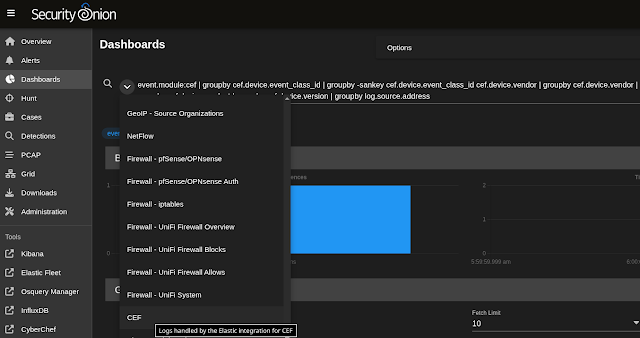
iptables dashboard:

UniFi Firewall Overview dashboard:

UniFi Firewall Blocks dashboard:

UniFi Firewall Allows dashboard:

UniFi System dashboard:

Elastic 8.18.4

Security Onion Pro Hypervisor Feature
Security Onion Pro users can create a hypervisor node that can run virtualized instances of Security Onion. If you have eligible machines with extra horsepower, you can use this feature to spin up additional Security Onion virtual machines (VMs) to take advantage of that extra power. Contact your account manager to see if your hardware is supported.
Install a new node, select the DISTRIBUTED deployment option, choose Existing Deployment, and then select the Hypervisor option:


Once the base domain has been configured on the hypervisor (allowing VMs to be created), it should look like this:


Release Notes
https://docs.securityonion.net/en/2.4/release-notes.html#changes
Known Issues
For a list of known issues, please see:
https://docs.securityonion.net/en/2.4/release-notes.html#known-issues
About Security Onion
Security Onion is a free and open platform built by defenders for defenders. It includes network visibility, host visibility, intrusion detection honeypots, log management, and case management.
For network visibility, we offer signature based detection via Suricata, rich protocol metadata and file extraction using your choice of either Zeek or Suricata, full packet capture, and file analysis. For host visibility, we offer the Elastic Agent which provides data collection, live queries via osquery, and centralized management using Elastic Fleet. Intrusion detection honeypots based on OpenCanary can be added to your deployment for even more enterprise visibility. All of these logs flow into Elasticsearch and we’ve built our own user interfaces for alerts, dashboards, threat hunting, case management, and grid management.
Security Onion has been downloaded over 2 million times and is being used by security teams around the world to monitor and defend their enterprises. Our easy-to-use Setup wizard allows you to build a distributed grid for your enterprise in minutes!
Documentation
You can find our online documentation here:
https://docs.securityonion.net/en/2.4/
Documentation is always a work in progress. If you find documentation that needs to be updated, please let us know as described in the Feedback section below.
New Installations
If this is your first time installing Security Onion 2.4, then we highly recommend starting with an IMPORT installation as shown at:
https://docs.securityonion.net/en/2.4/first-time-users.html
Once you’re comfortable with your IMPORT installation, then you can move on to more advanced installations as shown at:
https://docs.securityonion.net/en/2.4/architecture.html
Existing 2.4 Installations
If you have an existing Security Onion 2.4 installation, you can update to the latest version using soup:
https://docs.securityonion.net/en/2.4/soup.html
Before updating your production deployment, we highly recommend testing the upgrade process on a test deployment that closely matches your production deployment if possible. This is especially important for releases that update components like Salt and Elastic.
2.3 EOL
As a reminder, Security Onion 2.3 reached End Of Life (EOL) on April 6, 2024:
https://blog.securityonion.net/2023/10/6-month-eol-notice-for-security-onion-23.html
Thanks
Lots of love went into this release!
Special thanks to all our folks working so hard to make this release happen!
- Josh Brower
- Jason Ertel
- Corey Ogburn
- Josh Patterson
- Mike Reeves
- Jorge Reyes
- Matthew Wright
Questions, Problems, and Feedback
If you have any questions or problems, please create a new Discussion at:
https://securityonion.net/discuss
Security Onion Pro
We recently celebrated 10 years in business by announcing Security Onion Pro:
https://blog.securityonion.net/2024/07/celebrating-10-years-of-security-onion.html
Security Onion Pro includes many enterprise features that folks have been asking for:
- Active Query Management
- External API
- Open ID Connect (OIDC)
- Data at Rest Encryption
- FIPS for the OS
- DoD STIG for the OS
- External Notifications in SOC
- Time Tracking inside of Cases
- Guaranteed Message Delivery
- Manager of Managers
- MCP Server
- Security Onion App for Splunk
- Hypervisor
You can read more about these enterprise features at:
Training
Need training? Start with our free Security Onion Essentials training and then take a look at some of our other official Security Onion training!
https://securityonion.net/training

Security Onion Solutions Hardware Appliances
We know Security Onion’s hardware needs, and our appliances are the perfect match for the platform. Leave the hardware research, testing, and support to us, so you can focus on what’s important for your organization. Not only will you have confidence that your Security Onion deployment is running on the best-suited hardware, you will also be supporting future development and maintenance of the Security Onion project!
https://securityonion.com/hardware

Cloud Installations
For new Security Onion 2 installations in the cloud, this new version will soon be available on the AWS, Azure, and GCP marketplaces!
AWS Marketplace and Documentation:
https://securityonion.net/aws/?ref=_ptnr_soc_blog_250812
https://docs.securityonion.net/en/2.4/cloud-amazon.html
Azure Marketplace and documentation:
https://securityonion.net/azure
https://docs.securityonion.net/en/2.4/cloud-azure.html
GCP Marketplace and documentation:
https://securityonion.net/google
https://docs.securityonion.net/en/2.4/cloud-google.html
Screenshot Tour
If you want the quickest and easiest way to try out Security Onion 2.4, just follow the screenshots below to install an Import node. This can be done in a minimal VM with only 4GB RAM! For more information, please see:
https://docs.securityonion.net/en/2.4/first-time-users.html