Cyber criminals are targeting every type of organization, from small businesses to large enterprises. Many people tend to believe that ransomware actors only target large enterprises and/or critical systems; unfortunately, the opposite is true. If you have internet-connected devices, you are at risk of a ransomware attack.
Some ransomware actors target very specific victim environments, others focus on particular verticals and/or sectors, and yet others take a more opportunistic approach to victim selection. These latter types of actors utilize a wide-net approaches, sometimes even purchasing access to victim environments from initial access brokers (IABs), whose role is to break into a wide variety of networks in order to later re-sell this access to threat actors such as ransomware actors.
Ransomware attacks in 2022: An overview
Tracking all ransomware incidents is impossible. Some victims negotiate directly with the threat actor and provide a ransom payment before the rest of the word becomes aware of the situation. Many incidents are worked in private with non-disclosure agreements (NDAs) signed by the parties involved. In these situations, the consulting groups involved are barred from discussing specifics.
Though even coming close to tracking all ransomware attacks is not possible, some groups release reports that contain statistics along with techniques, tactics, and procedures (TTPs) of the various groups involved.
The reports you will find released to the public are often written through the lens of the firm or group writing the report.
How serious is the threat of a potential ransomware attack?
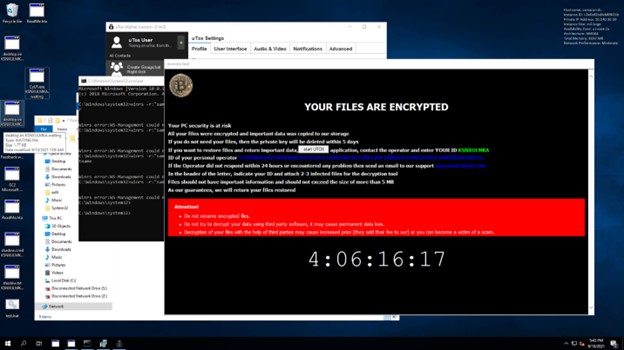
During the development of our SANS Forensics “FOR28: Ransomware for Incident Responders” course, we experienced a real-world, eye-opening attack. To generate the data for our labs and capture the flag (CTF) event, we created multiple networks ranges. One night, I left one of our ranges in a vulnerable state, purposefully. The servers in the range had Remote Desktop Protocol (RDP) open with insecure passwords for no more than 8 hours while I slept. I joked that I wanted to give a real threat actor a chance to brute-force one of the Administrator account passwords. When I awoke, I found that not only had the range been accessed, but the entire environment was ransomed! We could not have asked for a better, real-world example of just how serious the threat is… we’re up against a monster.

Figure 1. One of our network ranges after being ransomed after being vulnerable for no more than 10 hours.
Initial Access Brokers – Providing Access to Worldwide Networks
Notes on IABs and the top 3 ways that ransomware actors get in
Protecting Your Organization
What is the best way to protect me and my organization from ransomware?
The only way to stay safe from ransomware is to be prepared. As ransomware attacks increase in number and severity, even the most advanced security systems can be compromised. However, there is one thing that can help you fight back: train your team!
One of the most important things you can do as an organization is to train your cyber team on how to recognize the signs of a possible attack, what steps they should take, and how they can help prevent it from happening in the first place. A well-trained team will be able to identify what ransomware looks like, and help you work out a plan for responding if it’s detected on your network.
A recent study found that organizations that have trained their IT or cybersecurity teams are 28% less likely to experience a breach than those who haven’t. This makes sense: when you know what you’re doing, you can act quickly and efficiently when the time comes.
If you’re a business owner, you know that staying on top of the latest in cybersecurity can feel like an uphill battle. But there are ways to ensure that your business stays secure from the dangers of ransomware and other forms of malware.
Here are five tips for staying safe:
1. Train your cyber team on the newest threats and how they should respond
2. Keep your software updated with the latest patches and updates (this should be done automatically by default)
3. Don’t open suspicious emails or click on links
4. Keep an eye out for unusual activity on your network—if something looks suspicious, don’t hesitate to reach out for help!
5. Encrypt all sensitive data so even if it does get stolen, it’s not stored in plaintext

Learn more about the course at www.sans.org/FOR528